Welcome to The Tech Hospital(TTH)

Welcome to You to THE TECH HOSPITAL (TTH). The Best,Easy Technological Solutions & Updates notifying site in the World. Thanks for Your Support.

Friday, July 14, 2017

How to Create/Join/Start adfly (Adf.ly) Account Properly| Best,Easy & Trusted Link Shrink Earning System| Step by Step|


Hi! Everybody.

Are You Wanna Join & Earn Money from Adf.ly? Well. Are You Read about adf.ly & Know it Properly? You can Learn/know about adf.ly from [[here]]

Adf.ly is a link/URL shrink er site. It provides an affiliate program & also has a Referral program to earn money sharing their links. Today I will show you how to earn using this affiliate & Referral Program. Adf.ly Provide an Affiliate program that you can short your URL or Link with adf.ly & you can share it with your social friends or visitor. When They will click the link for targeted things (Example: Any file or website) they will stay 5 second & see some ads. after 5 second the visitor can skip the ads & when they skip their ads they will automatically redirect to their file site or url. That't it.

Anyway. Welcome to my Post. In this post I will show you how to create a adf.ly account properly with step by step.

Lets Start Create a Adfly Account(All the best)|


1. Click the Create a adf.ly Account & Then a new tab or window will be open like this Image. [[Create a adf.ly Account for free]]
2. Click on the Join now Button (Yellow Button or You can login with your fb account.) But If you will join with your facebook account if your fb account will be any problem so it can be effected. so try to keep adf.ly account separate.

Image result for adf.ly registretion form png3. Now Fill up the registration form with your own information. like Name,username, password, email, retype email, password, retype the password. Then You have a option calls account type. Select The "Link shrink er, creator and earn money" from the drop down menu. Then Fillup the Captcha code into the white box Like This(760  85838842) Give a spas in both different image. if you have any doubt Click on the refresh button in red box (on the volume button) You can listen it by playing. Now Read their terms and condition by clicking on the "terms and condition". After That Now mark on the box called"I agree to the terms and conditions" & Press the join Button.
Note: If you will not fill up all the box with proper information it will not be skip & ask you again about that. 
Related image


After That Your application will be submit you can see your profile. Well done. Now You are a adf.ly user (Creator). You are Ready to earn money with adf.ly. Best of Luck. Start earning with your link sharing.


Thanks for reading. If this content is helpful Please Share with your friends. Hit on the like button. follow me on G+. I will show you how to earn more with adf.ly.

If you have any question about adf.ly? Please feel free to ask me. I will try to help you to get solution about your problems. Just leave a comment by comment box below.

Read More About Adf.ly

2. How to add referral (Publish soon)
3. How to show banner adf.ly banner into my own website/blog (Publish soon)
4. How to I withdraw my payment (Publish soon)
5. Is it trusted (Publish soon)
6. adf.ly features. (Publish soon)

Bye All the best tell then tech care.

Best Easy Online Earning System for Beggeiner | How To Earn Money From Adf.ly|Online Money Earning Help| About Adf.ly

Hi! Everybody.
Are you new in online? In this post I will show you a super easy way to earn money from online.
It is just for beginners. In this Way you can earn minimum 10$ & maximum 100$  per day. You can earn with Facebook also. It is Adf.ly. Please Read Carefully the full article to know all of about adf.ly

What is adf.ly?

Adf.ly is a link/URL shorten site. It has an affiliate program & also has a Referral program to earn money sharing their links. Today I will show you how to earn using this affiliate & Referral Program. You Can Learn More from their Official website [[Click Here]]

How does adf.ly work?

Adf.ly Provide an Affiliate program that you can short your URL or Link with adf.ly & you can share it with your social friends or visitor. When They will click the link for targeted things (Example: Any file or website) they will stay 5 second & see some ads. after 5 second the visitor can skip the ads & when they skip their ads they will automatically redirect to their file site or url. That't it.
You Can Learn More from Their official website  [[Click Here]]

How much pay adf.ly for every 1k Visitor?

Adf.ly will pay you 1$ to 2$ for every 1000/1k visitor. Like 2$ for every 1k visitor of US.UK.CANADA etc's & 1$ for every Bangladesh, Miyanmar.etc. They have different Rate for every different country.

What is referral program in adf.ly?
Well! adf.ly provides you a amazing way to earn money. Yes. It is Referral Program. You can add any person in adf.ly. after that adf.ly will be give you 20% commission of referrals earning. (example: your referral earned 10$ so adf.ly will give you 2$ extra. Many People think If I will be a referral so I will loss my 20% earning. But it's not true. They will not minus the referral's earning. Just adf.ly give you 20% commission for the referral was came to adf.ly for you. Thant's it. You can learn more from their official website[[Click Here]]

How to share their links/URL with other for earn?

Well. Their are many kind of way to earn money with adf.ly. 

1. Earn from Facebook. (FB).
Now a day every person has a facebook account. If you have a facebook account. So. than means you can earn from adf.ly with facebook.
Suppose, You have 5k friends in fb. so. you can share very important sofware with your friends by posting. Then they will click the link for download targeted file. In next he will see some ads then he will skip ads. After that He/she will get download link & download the targeted files. It will now like a pain. because adf.ly is very famous. 95% people are know or use this step to download their files or go to targeted url/website.

2. Other Social Media(Twitter, Instagram, Linkedin, google+).
You can apply this tricks to other social media & you can earn from there.

3. Youtube.
Have you any youtube channel? Well. so that mans you can earn easily by sharing any file with viewers by video description.

4. Website.
Have you any kind of blog or website? It is very amazing & best way to earn money with your website. In this step you will get extra option. That is you can earn money with your website by showing their ads banner & that means you can easily ad referrals in your account. it is very interesting way to earn more with referral program. 

5. Other.
You can use this link shortner to any kind of money making.

How to start Earning?

If you are decided that you will work with adf.ly. Then you cant fraught with adf.ly. remove every kind of negative tricks from your mind. work properly and earn more.

1. Create account

At first you need to create a account to earn money with adfly. 
 ======How to create a Adf.ly account properly? Read More>>  or
                                             
                                          ***[[Create an adf.ly account for free Click Here]]**

2. grow your audience in your virtual galaxy. 

Now you need to connect with more people in the internet. Grow a youtube Channel/Website or Blog/Social Media friends. to get more view in adf.ly.

3. Now Short Link & share to start. earning.

After Creating Account You will see your profile. Pest the targeted link in the box & Copy the Link the share.

Now you are Ready to earn online. All the best.

Thanks for Reading carefully.
Have you any question? Ask me by leave a comment below.
If the Post is helpful Please Share with your Friends & Hit the like button. 

------------------------------------------------------------------------------------------------------------------------

More Tutorial about adf.ly earning. (coming soon)
1. How to get paid in adf.ly
2. how to get referral code/add referral.
3. how to show banner in my website.
4. Adf.ly Earning Instruction.
5. More Tips & tricks about adf.ly

Wednesday, July 5, 2017

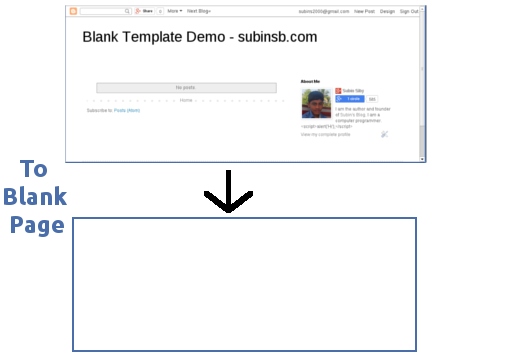
How to make a blank Blogger Template Easily | Create Blank Template for your Blog as your own design.


Blogger Templates can be very messed up with lots and lots of code. If you are trying to create a Blogger Template from scratch, the first thing you need is a blank HTML page. That’s exactly what we are going to do today.


Lets Start. All the best.


Simple Template To Blank Page
Blogger Simple Template To Blank Page

Criterias

Blogger won’t allow you to just add the following code as template :
<html>
 <head>
  <title>My Awesome Blank Blog</title>
 </head>
 <body>
 </body>
</html>
They will print out errors if you try to save the template. There are certain criteria for making a template for Blogger Blog :
  1. There must be skin (<b:skin></b:skin>) in the template
  2. A template must have at least one b:section tag
  3. Every section should have a unique id.
  4. Correct Syntax
If the above criterias are met, Blogger won’t produce any errors when saving the template. For creating a blank HTML Template, we will make sure these criterias are met.

Contents Of Blogger Blank Template

As we said before, Blogger Templates should meet the criterias of Blogger. A Blank Blogger Template should contain the following :
  1. Basic HTML Page Tags (html, head, body) and their closings
  2. Only one <b:skin></b:skin> tag
  3. Need At least a <b:section></b:section> tag.

Create Template

Make sure your blog is using Simple Template. If not, apply Simple Template to your blog.
Go to your Blogger Blog -> Template and click on Edit HTML button. Remove the contents of Template.
We will now add the Basic HTML page to the Template :
<?xml version="1.0" encoding="UTF-8" ?>
<html xmlns='http://www.w3.org/1999/xhtml' xmlns:b='http://www.google.com/2005/gml/b' xmlns:data='http://www.google.com/2005/gml/data' xmlns:expr='http://www.google.com/2005/gml/expr'>
 <head>
 </head>
 <body>
 </body>
</html>

Head

The contents of the <head></head> tag are the title, skin and other elements. We should add the normal codes that are seen on Blogger Templates first :
<meta content='IE=EmulateIE7' http-equiv='X-UA-Compatible'/> 
 <b:if cond='data:blog.isMobile'> 
  <meta content='width=device-width,initial-scale=1.0,minimum-scale=1.0,maximum-scale=1.0' name='viewport'/> 
 <b:else/> 
  <meta content='width=1100' name='viewport'/> 
 </b:if> 
<b:include data='blog' name='all-head-content'/>
Add the title :
<title><data:blog.pageTitle/></title>
Add the Skin with basic CSS that can be changed using Blogger’s Template Designer :
<b:skin>
 <![CDATA[/* 
  body { 
   font: $(body.font); 
   color: $(body.text.color); 
   background: $(body.background); 
   padding: 0 $(content.shadow.spread) $(content.shadow.spread) $(content.shadow.spread); 
   $(body.background.override) margin: 0; 
   padding: 0; 
  }
 ]]>
</b:skin>
There are more styles that can be inserted in <b:skin>, but only body’s is mentioned here. By adding more style rules into it, you will be easily able to update the colors, background etc… from the Template Designer.
There are additional CSS files that are loaded by Blogger before <b:skin>. If you want to disable that, see this post.

Body

Blogger needs a <b:section> element in template. So, we should add it inside body.
<b:section id='main' showaddelement='yes'/>
This section is the main section of the blog where we can add gadgets to it.

The Whole Code

And the whole Template code would be :
<?xml version="1.0" encoding="UTF-8" ?>
<html xmlns='http://www.w3.org/1999/xhtml' xmlns:b='http://www.google.com/2005/gml/b' xmlns:data='http://www.google.com/2005/gml/data' xmlns:expr='http://www.google.com/2005/gml/expr'>
 <head>
  <meta content='IE=EmulateIE7' http-equiv='X-UA-Compatible'/> 
  <b:if cond='data:blog.isMobile'> 
   <meta content='width=device-width,initial-scale=1.0,minimum-scale=1.0,maximum-scale=1.0' name='viewport'/> 
  <b:else/> 
   <meta content='width=1100' name='viewport'/> 
  </b:if> 
  <b:include data='blog' name='all-head-content'/>
  <title><data:blog.pageTitle/></title>
  <b:skin>
   <![CDATA[/* 
    body { 
     font: $(body.font); 
     color: $(body.text.color); 
     background: $(body.background); 
     padding: 0 $(content.shadow.spread) $(content.shadow.spread) $(content.shadow.spread); 
     $(body.background.override) margin: 0; 
     padding: 0; 
    }
   ]]>
  </b:skin>
 </head>
 <body>
  <b:section class='main' id='main' showaddelement='yes'/>
  <!-- Please Keep The Credits -->
  <center><a href="//subinsb.com/make-a-blank-blogger-template">Blank Template By subinsb.com</a></center>
 </body>
</html>

Additional Code adding

  • Add additional CSS codes inside <b:skin></b:skin>
  • Add JavaScript codes before </head> or after <head>
  • Add HTML codes (widgets, code) inside <body>.
  • You can do all the stuff in this template just like you do it a HTML page.
If you want to display the Posts, add the following code inside <b:section></b:section> in body :
<b:widget id='Blog1' locked='true' title='Blog Posts' type='Blog'/>
Example :
<b:section class='main' id='main' showaddelement='yes'>
  <b:widget id='Blog1' locked='true' title='Blog Posts' type='Blog'/>
</b:section>
Save your template and check out your blog. You will now have a plain blank Blog.

Sunday, July 2, 2017

Free Download Adobe Creative Cloud(CC)Products 2017 Fast with IDM| for ...

Download your Adobe All CC2017 Products for Free. You can also download it without Adobe CC Apps. Download your Software with IDM or your default down loader. It will save your time. The links & software are 100% virus free. You can download your apps by just skip a adds. Now Its your Try.  


Free Download Latest version of Adobe All CC 2017 Products Fast & Original with IDM for Windows & Mac 32X-64X

Direct Download Links for Windows 64X:

1. Adobe Media Encoder CC 2017 http://pintient.com/29Pi
2. After Effects CC 2017                 http://pintient.com/29Pq
3. Audition CC 2017                        http://pintient.com/29Pz
4. Bridge CC 2017                          http://pintient.com/29Q6
5. Illustrator CC 2017                      http://pintient.com/29QC
6. Photoshop CC 2017                    http://pintient.com/29QH
7. Premiere Pro CC 2017                http://pintient.com/29QP

Direct Download Links for Windos 32X:

1. Bridge CC 2017                            https://download-esd.adobeoobe.com/Ad...
2. Illustrator CC 2017                        http://pintient.com/29QZ
3. Photoshop CC 2017                     http://pintient.com/29Qb

Direct Download Link for Mac 64X.

1. Adobe Media Encoder CC 2017 http://pintient.com/29Qm
2. After Effects CC 2017                 http://pintient.com/29Qo
3. Audition CC 2017                        http://pintient.com/29Qs
4. Bridge CC 2017                           http://pintient.com/29Qw
5. Illustrator CC 2017                      http://pintient.com/29R5
6. Photoshop CC 2017                    http://pintient.com/29R7
7. Premiere Pro CC 2017                http://pintient.com/29R9


All in One here Check please:         http://pintient.com/29RF

Active your Adobe CC 2017 Products for Free Crack File: https://www.facebook.com/185136478179...

Visit for more http://www.adobe.com/creativecloud/ca...
https://en.wikipedia.org/wiki/Adobe_C...


Watch The Video Tutorial.


<<How to Create a Website/Blog For Free

Saturday, July 1, 2017

Create A Website in 6 minute | Compleat Blogger Tutorial (CBT part 1)

Create A website (Blog) in 6 Minutes (Easy Blogger Tutorial)

Website is a best way to promote your knowledge with the world. Now a days to Creating website is very easy. You can create your own website easily with blogger.com. How to help a website or blog to you?
1. Just for wish.
2. Grow your business. 
3. Post your CV. (it will help to you for get a job)
4. Sell your Products.
5. Grow Your Popularity.
6. Earning/Outsourcing.
7. Coming soon.

1. Just for wish.

Many people want to create a website just for their wish. It will upgrade your value in your friends or other people. You can also write something on your website or you can save your important things to your website to get them anywhere. you can also use it like a personal dairy.  so you can create a Personal website just for your wish.

2. Grow your Business.  

Now you can grow your business in the internet by a website. It will help you to get more customer in your shop or company. A website will help you to publicity about your business. so as soon as possible create a website about your company with your company name.

3. Post your CV.

Suppose you are finding a job. You should submit your Curriculum Vitae to many kind of company. Now you can create a website about you and give the URL to your cv. or share your site link to job seeker website. It will give you extra confidence. The employee chooser will be attracted in you. so create a website for your CV.

4. Sell your Products. 

Suppose you are an employer. But You want to do a part time business about sell something. a website will help you to sell your products quickly. or you can share something with the many friends by sharing just an URL. so it will help you about your small business. 

5. Grow your Popularity.

About all of the famous person has a website just for get their fans attention. a website will give you extra face value in your nearby or friends.

6. Earning or Outsourcing.

Now a Days You can earn with the website by many ways. like showing advertisement. You can earn by publish any other companies adds. when your visitor will be click in add you will get some revenue. if you have many visitor you will get more revenue. Many people choose this job for develop their career. It is a best way to earn from the Internet. It is a kind of outsourcing. You can share your knowledge with the hole world by just a website. when people searching the internet some thing they will find your website and they will get their solution from your website. even this is a chance to famous yourself. Many people trying this way to earn but 55% can't success. Because it is a lengthy process. But it is a great way to earn & develop your career. It also can be a fixed earning for your hole life. It is like a money tree. when your website will be grow up it will give you money without any kind of cost. So what you thinking? If you have some free time try it now. It will not west your full time. you can work as your free time. so lets start.

How to Create a website from blogger.com?

1. sign in to your gmail account or if you have not a gmail account create a gmail account
2. go to the Blogger.com  

3. click on create a new blog button.

4. Now you are a owner of a website or a blogger.
watch the full video tutorial from here đŸ”ģ 


Is this post helpful? Please leave a comments.
ask for your solution in comments.
Free Download Adobe CC2017 All Apps for Free Direct Download Link>>

Videos Medicines.